Alarm Notification
Feature Description
When an alarm is triggered, you can configure users to receive notifications. We will send notifications to the user's email inbox, allowing users to be immediately aware of the alarm status.
Configuration Instructions
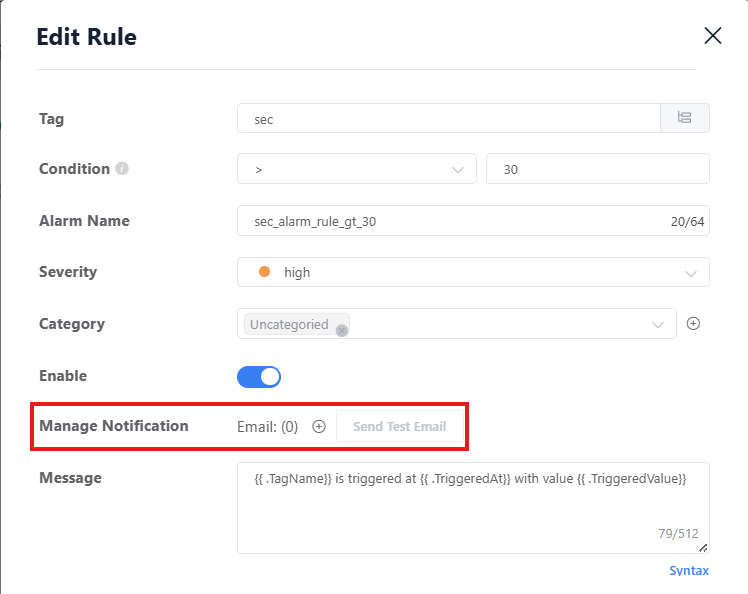
- On the alarm rule configuration page, you can select which alarm rules will trigger notifications. When these rules are triggered, the system will automatically send notifications to relevant users.
User Settings
- You can select multiple users to receive alarm notifications. Each user can set their own email address to ensure they can receive alarm notifications.
- Users can opt out of receiving these alarm notifications. You can go to the user settings page, find the "Receive Alarm Notifications" option, and turn it off. For more information, please refer to the
Account Settingsdocumentation.
Send Test Email
- On the alarm rule configuration page, you can click the "Send Test Email" button to test the alarm notification feature. The system will send a test email to the email address you configured to ensure the notification feature is working properly.
- Test emails can be sent once every 60 seconds. After you click the "Send Test Email" button, the system will display a prompt telling you when you can test again.
Feature Limitations
- Each email inbox can receive a maximum of 1 email notification every 5 minutes. All alarm events received during this period will be combined into one email notification.
- An alarm rule can have a maximum of 10 users receiving notifications.
- If different users use the same email inbox, these users will only receive one email, and their alarm events will be combined.