Diagnosis
EasyAccess 2.0 Application
TCP Connection Test
To use EasyAccess 2.0 VPN connection, multiple TCP connection would be made from your HMI or PC to our vpn servers.
On PC, you can download our analyzer tool ea_connection_test.zip to check connections to those servers.
Double-click "GlobalAnalyze.bat" or "ChinaAnalyze.bat" until it finishes, then check the result from "analyze_result.txt".
On the HMI, you need to make sure HMI can connect to EasyAccess 2.0 servers
If any error happens, please help check your network settings (Ex: firewall).
If you still don't know what to do. You can contact our online customer service for help.
For access of Global server: https://www.weincloud.net
For access of China server: https://www.weincloud.net.cn
DNS Test
Please run "analyze.bat" and check the result from "analyze_result.txt" in dns_check.zip.
Driver install fail
1. Please help check if ther's any anti-virus program running (Ex: Eset Nod32 Antivirus). If yes, please disable it and reboot operating sysytem. Then open EasyAccess 2.0 again
2. If driver is still install fail. Please create a folder C:\tmp, open EasyAccess 2.0 again and send us the log file C:\tmp\easy_access_master_app.log
EasyAccess 2.0 application can not login
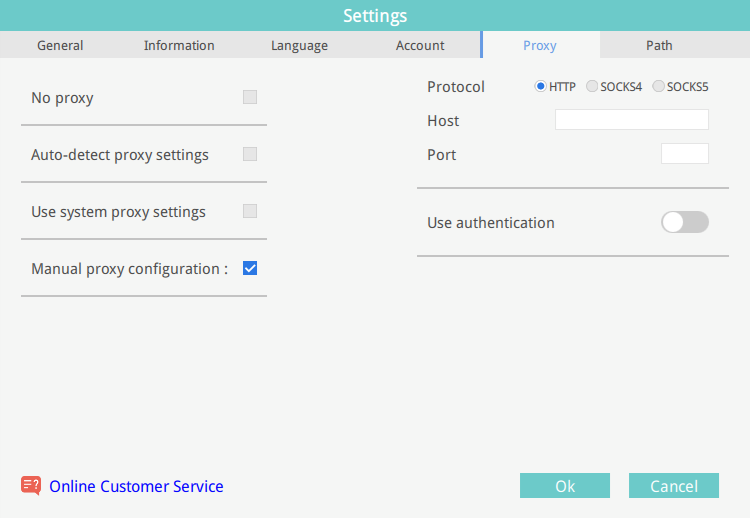
Try below proxy to see if it works
- Check Manual proxy configuration
- Select HTTP as the protocol
- Host:
sgproxy.easyaccess.io - Port:
3128 - Click Ok and try to log in again