Connect HMI to Weincloud

Overview
Configure login credentials for a cMT-X project in EasyBuilder Pro to connect the HMI to Weincloud and enable the Dashboard service to monitor and transmit HMI data. After the project is downloaded to the HMI, the HMI reports its connection status and buffer usage through the registers configured under [Address Tab]; an external program can also use control registers to start or stop the connection. This document describes the login procedure and the definitions of the status and control registers.
Use Cases and Target Audience
This document is intended for users developing cMT-X projects in EasyBuilder Pro who need to connect the HMI to Weincloud, including:
- Users configuring Weincloud login credentials in a project for the first time, to establish the connection between the HMI and Weincloud.
- Users who need to monitor the HMI's connection status and buffer usage with Weincloud, or use registers to start or stop the connection.
Feature Details
Prerequisites
- A Weincloud account and the correct Domain information.
- EasyBuilder Pro with a cMT-X project open.
Login and Connection Steps
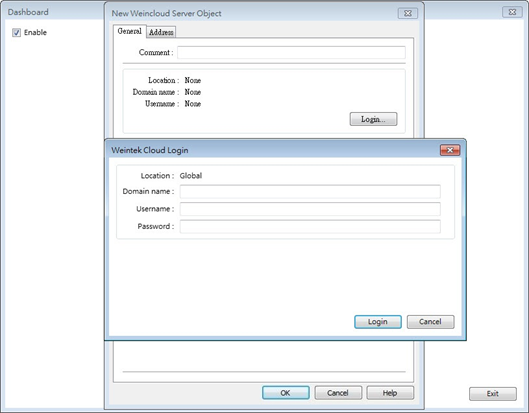
- Open the [Weincloud] tab from the top menu and select the correct Weincloud region.
- Click [Dashboard] to open the General Properties window.
- In this window, click [Login] and enter the correct Weincloud Domain information to complete login.
- Download the project to the HMI.
After completing these steps, the HMI connects to the Weincloud server.
Keep Alive Time
[Keep alive time] determines when the HMI is considered disconnected: if the Weincloud server has not received a test message from the HMI within this time, the HMI is considered disconnected.
Address Tab
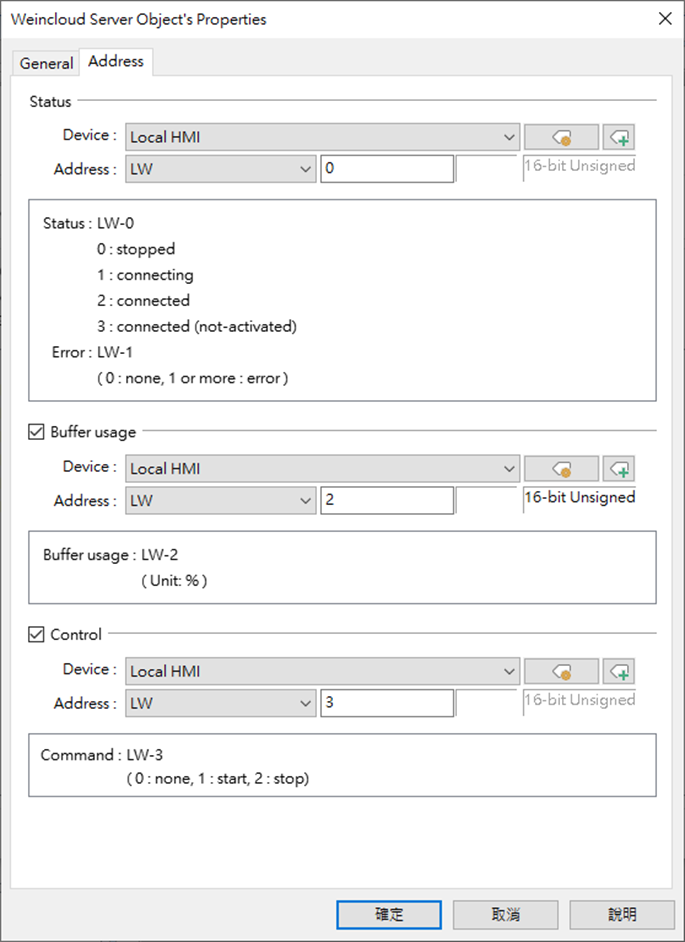
Status Address
LW-n: Displays the [Dashboard] connection status.
| Value | Description |
|---|---|
| 0 | Stop |
| 1 | Connecting |
| 2 | Connected |
| 3 | Connected (not activated) |
LW-n+1: Error code. See Trouble Shooting for error code definitions.
Buffer Usage Address
Messages that have not been successfully published are buffered in memory, with a maximum capacity of 1000 messages.
LW-n: Displays buffer usage as a percentage (%), rounded up.
Control Address
LW-n: Controls the [Dashboard] connection to start or stop.
| Value | Description |
|---|---|
| 0 | None |
| 1 | Start |
| 2 | Stop |
Limitations and Notes
- In simulation mode, message delivery may be delayed, but the delay will not exceed the configured [Keep alive time]; messages from the actual HMI are sent without delay.