Dashboard Data API
Permissions
The permissions of the API key are determined by the user who created it.
Managing API Keys
You can manage your API keys on the Account Settings page in the upper right corner. Click View API Keys
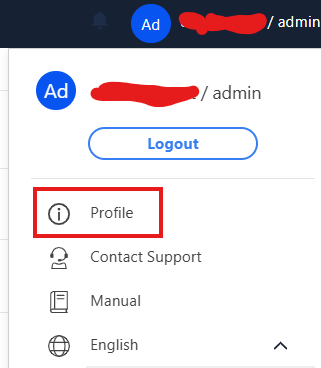
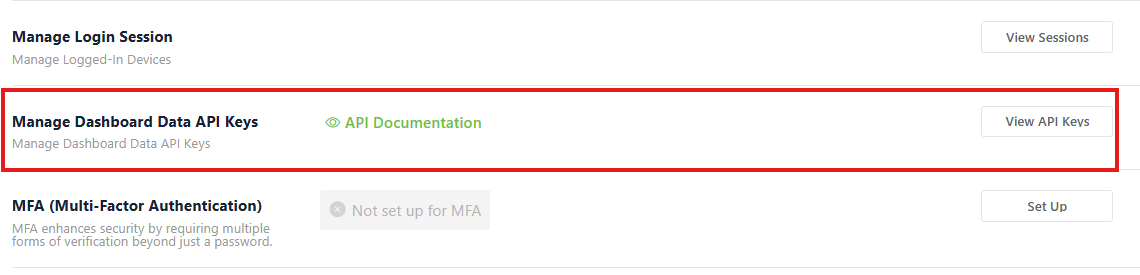
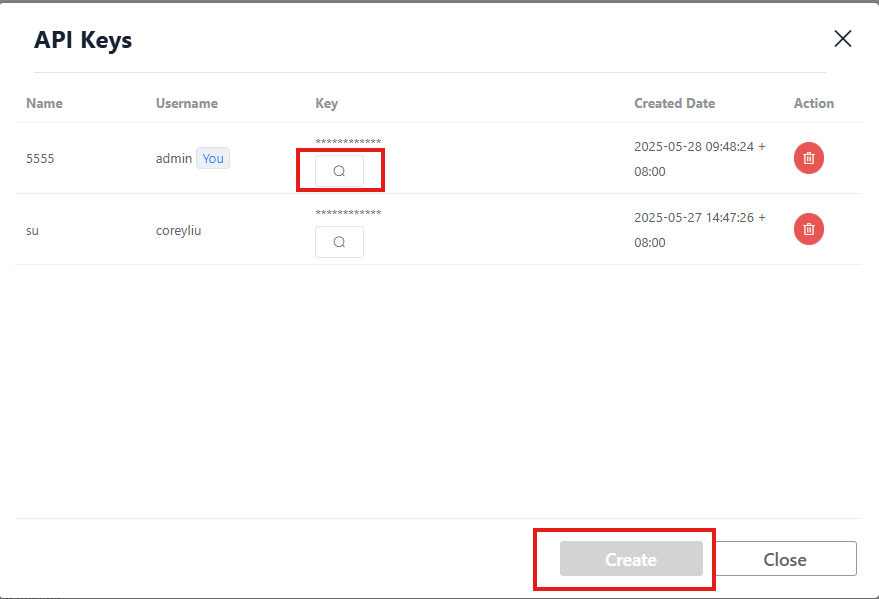
Click Add to create a new key
You can click the magnifying glass to view your key
You can also delete it directly
API Documentation
Global server documentation location
https://www.weincloud.net/open-apiChina server documentation location
https://www.weincloud.net.cn/open-api
Or you can click API Documentation to view the available APIs
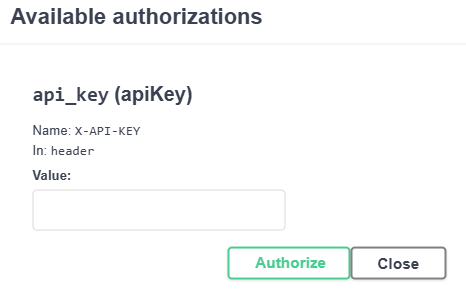
This will list all available APIs. The Authorize button in the upper right corner is where you place your API key

Please enter your API key in the Value field
If you want to use it manually
Simply include the following in the HTTP Request Header
X-API-KEY: {your API key}
Then you can access your API
API Introduction
The following APIs are currently available to retrieve relevant data (for detailed API usage, please refer to API Documentation)
Get Tag Properties
GET /dashboard/api/v2/open_api/hmi/{hw_key}/tags
Retrieve all tag information for the specified HMI, including tag names, data types, units, and other properties.
Get Tag Historical Data
POST /dashboard/api/v2/open_api/history
Retrieve historical data for specified tags. You can specify time range and sampling method, suitable for drawing trend charts or data analysis.
- Can retrieve historical data for multiple tags at once, and can specify the sampling method for each tag (average, sum, maximum, minimum, etc.)
- There are data limits, please refer to the Data Limit section for details
Get Latest Tag Data
POST /dashboard/api/v2/open_api/latest
Retrieve the latest values for specified tags, suitable for real-time monitoring or dashboard display.
- Can retrieve latest data for multiple tags at once
- There are data limits, please refer to the Data Limit section for details
Get Alarm Categories
GET /dashboard/api/v2/open_api/alarms/categories
Retrieve a list of all alarm categories in the system, used for alarm management and category queries.
Get Alarm Rules
POST /dashboard/api/v2/open_api/hmi/{hw_key}/alarms/rules
Retrieve alarm rule settings for the specified HMI, including trigger conditions, alarm levels, and other information.
Get Alarm History
POST /dashboard/api/v2/open_api/hmi/{hw_key}/alarms/history
Retrieve alarm history records for the specified HMI. You can specify time range and filter conditions, used for alarm tracking and analysis.
Data Limit
To ensure system stability, there are currently restrictions on retrieving tag historical data. The restrictions are as follows:
Maximum of 4320 data points can be retrieved in a single request
- In real-time mode of the trend chart, we use
5 secondsas the unit to retrieve data, so you can retrieve up to6 hoursof data at most
60(seconds)*60(minutes)*6(hours)/5(seconds) = 4320
- If aggregate mode is enabled, we use
window sizeas the unit to retrieve data If the window size is1 minute, then you can retrieve up to3 daysof data at most
60(seconds)*60(minutes)*24(hours)*3(days)/60(seconds) = 4320
Actions to take when encountering single retrieval limits
- Adjust the time range to within the limit
- Enable
Aggregate Modeand adjust thewindow sizeto a larger value, which will reduce the amount of data retrieved each time - Retrieve data in segments, divide the time range into multiple segments, retrieve data for one segment at a time, and finally merge these data
Traffic Limit
Currently, a single HMI can only retrieve approximately 100MBytes of data within 15 minutes. Exceeding this limit will result in retrieval failure